Use
Misc
- Packages
- {requests-ratelimiter} - A simple wrapper around pyrate-limiter v2 that adds convenient integration with the requests library
- {tenacity} - A general-purpose retrying library, written in Python, to simplify the task of adding retry behavior to just about anything (See {requests} >> Rate Limiting >> Example)
- Without backoff: 1000 failed requests retry simultaneously → rate limit → all fail again
- With exponential backoff: Requests spread out over time → fewer rate limit hits → higher success rate
- Benchmark: Reduces API failures from 15% to <1% in production pipelines
- Resources
- W3 School HTTP Request methods reference page
- Exponential Backoff
- Retries: Waits 1s, 2s, 4s, 8s between retries (up to a threshold (e.g. 60s)
- When to use:
- API calls (rate limits, transient errors)
- Database connections (connection pool exhaustion)
- Network I/O (timeouts, temporary network issues)
- External service calls (third-party APIs that throttle)
- When not to use it:
- Logic errors (retrying won’t help)
- Authentication failures (will always fail)
- CPU-bound operations (backoff doesn’t help computation)
Terms
- Body - information that is sent to the server. (Can’t use with GET requests.)
- Endpoint - a part of the URL you visit. For example, the endpoint of the URL https://example.com/predict is /predict
- Headers - used for providing information (think authentication credentials, for example). They are provided as key-value pairs
- Method - a type of request you’re sending, can be either GET, POST, PUT, PATCH, and DELETE. They are used to perform one of these actions: Create, Read, Update, Delete (CRUD)
- Pooled Requests - A technique where multiple individual requests are combined or “pooled” into a single API call. May require more complex error handling, as you’ll need to manage partial successes or failures within the pooled request
- Methods
- Batch endpoints: Some APIs offer specific endpoints designed to handle multiple operations in a single call.
- Request bundling: Clients can aggregate multiple requests into a single payload before sending it to the API.
- Methods
Request Methods
Misc
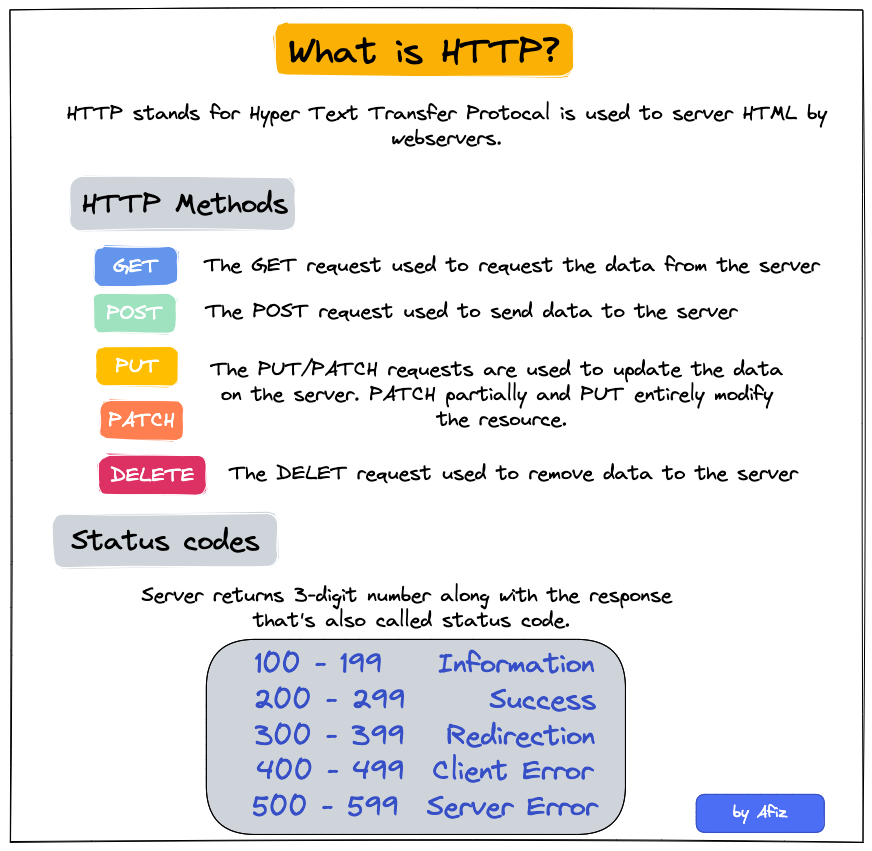
- If you’re writing a function or script, you should check whether the status code is in the 200s before additional code runs.
- HTTP 429 - Too Many Requests
GET
GET is a request for data where the parameters for that request are inserted into the URL usually after a ?.
Examples
# example 1 args <- list(key = "<key>", id = "<id>", format = "json", output = "full", count = "2") api_json <- GET(url = URL, query = args) # example 2 (with headers) res = GET("https://api.helium.io/v1/dc_burns/sum", query = list(min_time = "2020-07-27T00:00:00Z" , max_time = "2021-07-27T00:00:00Z"), add_headers(`Accept`='application/json' , `Connection`='keep-live')) # example 3 get_book <- function(this_title, this_author = NA){ httr::GET( url = url, query = list( apikey = Sys.getenv("ACCUWEATHER_KEY"), q = ifelse( is.na(this_author), glue::glue('intitle:{this_title}'), glue::glue('intitle:{this_title}+inauthor:{this_author}') ))) }Example: Pull parsed json from raw format
my_url <- paste0("http://dataservice.accuweather.com/forecasts/", "v1/daily/1day/571_pc?apikey=", Sys.getenv("ACCUWEATHER_KEY")) my_raw_result <- httr::GET(my_url) my_content <- httr::content(my_raw_result, as = 'text') dplyr::glimpse(my_content) #get a sense of the structure dat <- jsonlite::fromJSON(my_content)contenthas 3 option for extracting and converting the content of the GET output.- “raw” output asis
- “text” can be easiest to work with for nested json
- “parsed” is a list
POST
Also see Scraping >> POST
POST is also a request for data, but the parameters are typically sent in the body of a json. So, it’s closer to sending data and receiving data than a GET request is.
When you fill out a html form or search inputs on a website and click a submit button, this is a POST request in the background being sent to the webserver.
Example
# base_url from get_url above base_url <- "https://tableau.bi.iu.edu/" vizql <- dashsite_json$vizql_root session_id <- dashsite_json$sessionid sheet_id <- dashsite_json$sheetId post_url <- glue("{base_url}{vizql}/bootstrapSession/sessions/{session_id}") dash_api_output <- POST(post_url, body = list(sheet_id = sheet_id), encode = "form", timeout(300))Example: json body
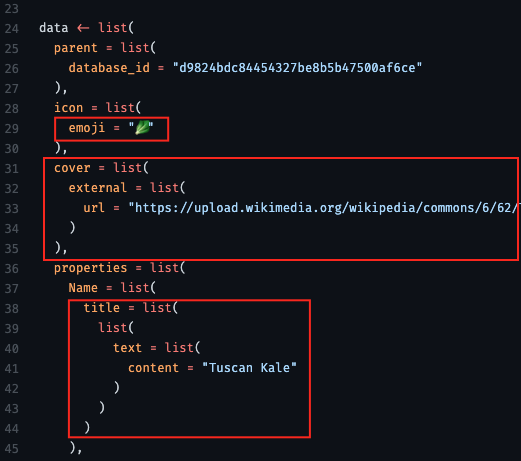
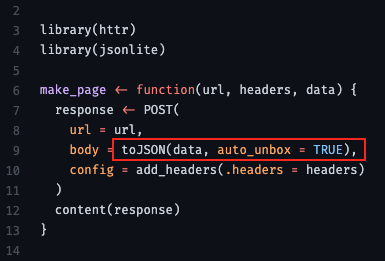
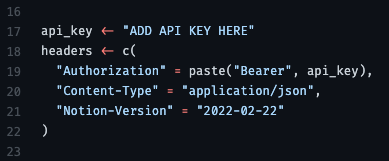
- From thread
- “use auto_unbox = TRUE; otherwise there are some defaults that mess with your API format”
- “url” is the api endpoint (obtain from api docs)
- headers
{httr2}
POST
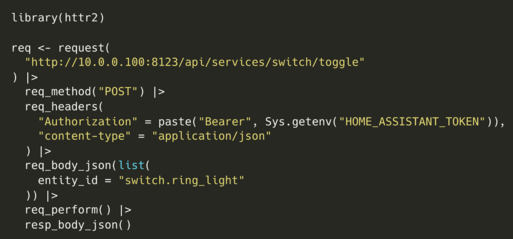
- Contacts Home Assistant API and turns off a light.
Paginated Requests
- Also see Scraping >> API >> GET >> Example: Real Estate Addresses
- Example: (source)
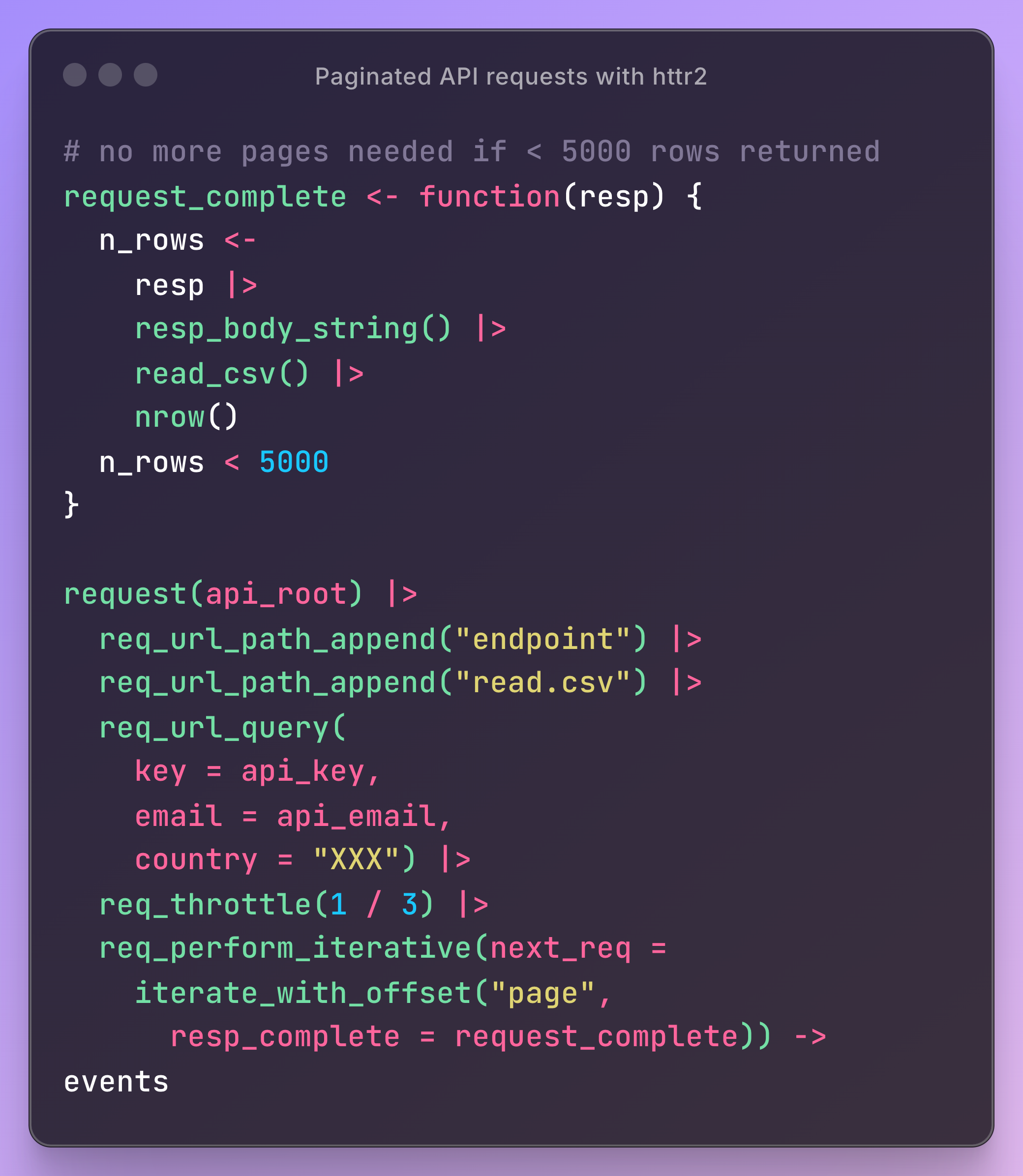
request_completechecks the response to see whether another is needed.req_perform_iterativeis added to the request, giving it a canned iterator that takes your function and bumps a query parameter (page for this API) every time you do need another request
GET Request in Parallel
Example
pacman::p_load( dplyr, httr2 ) reqs_dat_comp <- tib_comp |> mutate(latitude = as.character(latitude), longitude = as.character(longitude)) reqs_comp <- purrr::map2(reqs_dat_comp$longitude, reqs_dat_comp$latitude, \(x, y) { request("https://geocoding.geo.census.gov/geocoder/geographies/coordinates") |> req_url_query( "benchmark" = "Public_AR_Current", "vintage" = "Current_Current", "format" = "json", "x" = x, "y" = y ) }) resps_comp <- req_perform_parallel(reqs_comp, max_active = 5) length(resps_failures(resps_comp)) pull_geoid <- function(resp) { resp_json <- resp_body_json(resp) cb_name <- stringr::str_extract(names(resp_json$result$geographies), pattern = "\\d{4} Census Blocks$") |> na.omit() loc_geoid <- purrr::pluck(resp_json, 1, 1, cb_name, 1)$GEOID |> stringr::str_sub(end = 12) return(loc_geoid) } tib_geoids_comp <- resps_data(resps = resps_comp, resp_data = pull_geoid) |> tibble(geoid = _)- reqs_comp is a list of requests — each with different x and y values (longitude, latitude)
req_perform_parallelcalls the API with 5 requests at a timepull_geoidwrangles the responseresps_datatakes a list of responses and appliespull_geoidto each element
Don’t parse an JSON response to a string from an API
Responses are binary. It’s more performant to read the binary directly than to parse the response into a string and then read the string
Example: {yyjsonr} (source)
library(httr2) # format request req <- request("https://jsonplaceholder.typicode.com/users") # send request and get response resp <- req_perform(req) # translate binary to json your_json <- yyjsonr::read_json_raw(resp_body_raw(resp))- Faster than the httr2/jsonlite default,
resp_body_json
- Faster than the httr2/jsonlite default,
{requests}
Basic Call (source)
import polars as pl import requests url = "https://pub.demo.posit.team/public/lead-quality-metrics-api/lead_quality_metrics" response = requests.get(url) content = response.text lead_quality_data = pl.read_json(io.StringIO(content))- The response is probably a json binary which gets parsed by
io.Stringand finally read into a polars df
- The response is probably a json binary which gets parsed by
Basic Call Using a Function (source)
import requests
import os
import pandas as pd
import matplotlib.pyplot as plt

def grab_ONS_time_series_data(dataset_id,timeseries_id):
    """
    This function grabs specified time series from the ONS API.
    """
    api_endpoint = "https://api.ons.gov.uk/"
    api_params = {
    'dataset':dataset_id,
    'timeseries':timeseries_id}
    url = (api_endpoint
                        +'/'.join([x+'/'+y for x,y in zip(api_params.keys(),api_params.values())][::-1])
                        +'/data')
    return requests.get(url).json()

# Grab the data (put your time series codes here)
data = grab_ONS_time_series_data('MM23','CHMS')

# Check we have the right time series
title_text = data['description']['title']
print("Code output:\n")
print(title_text)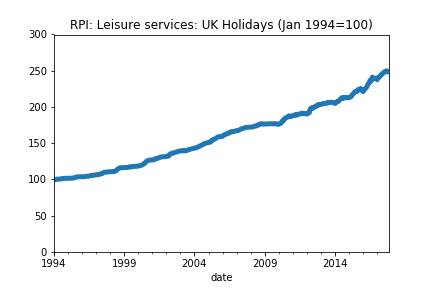
# Put the data into a dataframe and convert types
# Note that you'll need to change months if you're
\
# using data at a different frequency
df = pd.DataFrame(pd.io.json.json_normalize(data['months']))

# Put the data in a standard datetime format
df['date'] = pd.to_datetime(df['date'])
df['value'] = df['value'].astype(float)
df = df.set_index('date')

# Check the data look sensible
print(df.head())

# Plot the data
df['value'].plot(title=title_text,ylim=(0,df['value'].max()*1.2),lw=5.)
plt.show()
Bundle into a Class (source)
class Weather:

    # Define the constructor
    def __init__(self, API_KEY):
        self.API_KEY = API_KEY

    # Define a method to retrieve weather data
    def get_weather(self, city, country, units='imperial'):
        self.city = city
        self.country = country
        self.units = units

        # Make a GET request to an API endpoint that returns JSON data
        url = f"https://api.openweathermap.org/data/2.5/weather?q={city},{country}&APPID={w.API_KEY}&units={units}"
        response = requests.get(url)

        # Use the .json() method to parse the response text and return
        if response.status_code != 200:
            raise Exception(f"Error: {response.status_code} - {response.text}")
        return response.json()

# Get the API OpenWeatherMap key
API_KEY = dbutils.widgets.get('API_KEY')

# Instantiate the class
w = Weather(API_KEY=API_KEY)

# Get the weather data (json)
nyc = w.get_weather(city='New York', country='US')
Use
Sessionto make a pooled request to the same host (Video, Docs)Example
import pathlib import requests links_file = pathilib.Path.cwd() / "links.txt" links = links_file.read_text().splitlines()[:10] headers = {"User-Agent": "Mozilla/5.0 (X!!; Linux x86_64; rv:89.0) Gecko/20100101 Firefox/89.0} # W/o Session (takes about 16sec) for link in links: response = requests.get(link, headers=headers) print(f"{link} - {response.status_code}") # W/Session (takes about 6sec) with requests.Session() as session: for link in links: response = session.get(link, headers=headers) print(f"{link} - {response.status_code}")- The first way syncronously makes a get request to each URL
- Makes several requests to the same host
- The second way reuses the underlying TCP connection, which can result in a significant performance increase.
- The first way syncronously makes a get request to each URL
Retrieve Paged Results One at a Time
Generator
from typing import Iterator, Dict, Any
from urllib.parse import urlencode
import requests


def iter_beers_from_api(page_size: int = 5) -> Iterator[Dict[str, Any]]:
    session = requests.Session()
    page = 1
    while True:
        response = session.get('https://api.punkapi.com/v2/beers?' + urlencode({
            'page': page,
            'per_page': page_size
        }))
        response.raise_for_status()

        data = response.json()
        if not data:
            break

        yield from data

        page += 1
Iterate through each page of results
beers = iter_beers_from_api()
next(beers)
#> {'id': 1,
#>  'name': 'Buzz',
#>  'tagline': 'A Real Bitter Experience.',
#>  'first_brewed': '09/2007',
#>  'description': 'A light, crisp and bitter IPA brewed...',
#>  'image_url': 'https://images.punkapi.com/v2/keg.png',
#>  'abv': 4.5,
#>  'ibu': 60,
#>  'target_fg': 1010,
#> ...
#> }
next(beers)
#> {'id': 2,
#>  'name': 'Trashy Blonde',
#>  'tagline': "You Know You Shouldn't",
#>  'first_brewed': '04/2008',
#>  'description': 'A titillating, ...',
#>  'image_url': 'https://images.punkapi.com/v2/2.png',
#>  'abv': 4.1,
#>  'ibu': 41.5,
#>  ...
#> }
Use Concurrency
Use threads on your computer to make requests at the same time. It’s essentially parallelism.
Example (source)
import requests from concurrent.futures import ThreadPoolExecutor, as_completed from requests_ratelimiter import LimiterSession # Limit to max 2 calls per second request_session = LimiterSession(per_second=2) def get_post(post_id: int) -> dict: if post_id > 100: raise ValueError("Parameter `post_id` must be less than or equal to 100") url = f"https://jsonplaceholder.typicode.com/posts/{post_id}" # Use the request_session now r = request_session.get(url) r.raise_for_status() result = r.json() # Remove the longest key-value pair for formatting reasons del result["body"] return result if __name__ == "__main__": print("Starting to fetch posts...\n") # Run post fetching concurrently with ThreadPoolExecutor() as tpe: # Submit tasks and get future objects futures = [tpe.submit(get_post, post_id) for post_id in range(1, 16)] for future in as_completed(futures): # Your typical try/except block try: result = future.result() print(result) except Exception as e: print(f"Exception raised: {str(e)}") future.add_done_callback(future_callback_fn) result = future.result() print(result)ThreadPoolExecutorclass manages a pool of worker threads for you- Number of CPUs + 4, e.g. 12 CPU cores means 16
ThreadPoolExecutorworkers
- Number of CPUs + 4, e.g. 12 CPU cores means 16
- Uses a standard
try/exceptto handle errors. Errors don’t stop code from completing the other requests future.add_done_callbackcalls your custom Python function. This function will have access to theFutureobject
Rate Limiting
Example: Exponential backoff with jitter
from tenacity import ( retry, stop_after_attempt, wait_exponential, retry_if_exception_type, ) import time import requests # Rate limiting: Don't exceed 100 requests/second RATE_LIMIT = 100 MIN_INTERVAL = 1.0 / RATE_LIMIT # 0.01 seconds between requests @retry( stop=stop_after_attempt(5), wait=wait_exponential(multiplier=1, min=1, max=60), retry=retry_if_exception_type((requests.HTTPError, ConnectionError)), reraise=True ) def fetch_with_backoff(url, last_request_time): """Fetch with rate limiting and exponential backoff.""" # Rate limiting: ensure minimum interval between requests elapsed = time.time() - last_request_time if elapsed < MIN_INTERVAL: time.sleep(MIN_INTERVAL - elapsed) response = requests.get(url, timeout=10) response.raise_for_status() return response.json(), time.time() # Process requests with rate limiting last_request_time = 0 for url in api_urls: data, last_request_time = fetch_with_backoff(url, last_request_time) process(data)- Backs off exponentially on failures, but add randomness (jitter) to prevent thundering herd problems.
- Exponential backoff: Waits 1s, 2s, 4s, 8s between retries (up to 60s max)
- Jitter: Tenacity adds randomness to prevent synchronized retries
- Conditional retries: Only retries on specific exceptions (not all errors)
- Max attempts: Stops after 5 attempts to avoid infinite loops
Using API keys
Example (source)
import requests
from requests.auth import HTTPBasicAuth
import json

username = "ivelasq@gmail.com"
api_key = r.api_key

social_url = "https://ivelasq.atlassian.net/rest/api/3/search?jql=project%20=%20KAN%20AND%20text%20~%20%22\%22social\%22%22"
blog_url = "https://ivelasq.atlassian.net/rest/api/3/search?jql=project%20=%20KAN%20AND%20text%20~%20%22\%22blog\%22%22"

def get_response_from_url(url, username, api_key):
    auth = HTTPBasicAuth(username, api_key)

    headers = {
        "Accept": "application/json"
    }

    response = requests.request("GET", url, headers=headers, auth=auth)

    if response.status_code == 200:
        results = json.dumps(json.loads(response.text), sort_keys=True, indent=4, separators=(",", ": "))
        return results
    else:
        return None

social_results = get_response_from_url(social_url, username, api_key)
blog_results = get_response_from_url(blog_url, username, api_key)
{http.client}
The Requests package is recommended for a higher-level HTTP client interface.
Example 1: Basic GET
import http.client
import json

conn = http.client.HTTPSConnection("api.example.com")
conn.request("GET", "/data")
response = conn.getresponse()
data = json.loads(response.read().decode())
conn.close()
Example 2:
GET
import http.client

url = '/fdsnws/event/1/query'
query_params = {
    'format': 'geojson',
    'starttime': "2020-01-01",
    'limit': '10000',
    'minmagnitude': 3,
    'maxlatitude': '47.009499',
    'minlatitude': '32.5295236',
    'maxlongitude': '-114.1307816',
    'minlongitude': '-124.482003',
}
full_url = f'https://earthquake.usgs.gov{url}?{"&".join(f"{key}={value}" for key, value in query_params.items())}'

print('defined params...')

conn = http.client.HTTPSConnection('earthquake.usgs.gov')
conn.request('GET', full_url)
response = conn.getresponse()
JSON response
import pandas as pd
import json

if response.status == 200:
    print('Got a response.')
    data = response.read()
    print('made the GET request...')
    data = data.decode('utf-8')
    json_data = json.loads(data)
    features = json_data['features']
    df = pd.json_normalize(features)

    if df.empty:
        print('No earthquakes recorded.')
    else:
        df[['Longitude', 'Latitude', 'Depth']] = df['geometry.coordinates'].apply(lambda x: pd.Series(x))
        df['datetime'] = df['properties.time'].apply(lambda x : datetime.datetime.fromtimestamp(x / 1000))
        df['datetime'] = df['datetime'].astype(str)
        df.sort_values(by=['datetime'], inplace=True)
else:
  print(f"Error: {response.status}")